I have recently made a little tool for personal use with two basic functionalities that help me to create libGDX projects.
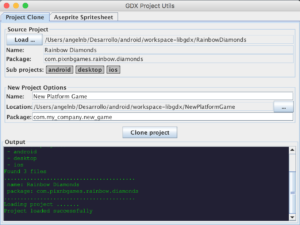
It have two functionalities:
- Project Clone: allows to clone libGDX projects.
- Aseprite Spritesheet: converts spritesheet generated by Aseprite to the atlas format used by libGDX.
GDX Project Utils: Project Clone
It allows to clone libGDX projects. The advantage is that it do neccesary changes of project name and base package. The below video shows an example of cloning, importing and execution in eclipse.
GDX Project Utils: Aseprite Spritesheet
This utility converts the spritesheets created with Aseprite to atlas format used by libGDX. The below video shows an example of use.
Clarifications and Download
This is a personal project that I’ll be improving according to my needs, but I don’t guarantee any kind of maintenance. That said, I share it in case it’s useful for someone else.
You can download the app in this link: gdx-project-utils-0.0.1-SNAPSHOT. It’s a java app, so you need have Java installed on your machine to run it. If the app does not run directly by doble cliking on the jar file, it’s possible to execute it with the below command:
java -jar gdx-project-utils-0.0.1-SNAPSHOT.jar
Thanks and regards,
This tool is great, but it would be nice to be able to run it on the command line, without a GUI, in order to automate a build process.